This section describes the important extra parameters that you need to consider if you are in channel porosity mode, i.e. if you have entered the channel porosity, rather than open porosity, of your sample. If you ignore this discussion, then the default parameters described below are often sensible, but merit further thought from you, as now described.
On the Curve Fitting screen, Figure CP 3, first click on the click on the small downward arrow next to the Cell properties label. The numbers in brackets show the number of pores in the x, y and z Cartesian directions, by default 15, 15 and 15. So by default there are up to 15 x 15 x 15 = 3375 pores, and as each pore can be connected to up to 3 throats in the positive Cartesian directions (and another three in the negative direction), there are up to 10125 throats. That may seem a lot, but nevertheless is too few to make a realistic estimate of the network capacity, which is related to the absolute permeability of the structure. Leave the setting as the default 15/15/15 unit cell size if you are just trying out the fitting and building algorithms, but if you want to obtain network capacity estimates, increase it to at least 20 x 20 x 20. Note that only cubic unit cells are fully supported in the current release, rather than cuboidal unit cells. For these instructions, we will leave the unit cell size at the default 15 x 15 x 15.
Now click the downward arrow next to Cell properties to minimise that dropdown menu. Then click the small downward arrow next to Advanced... to reveal the Advanced options. Scroll down to the bottom of the list of options :
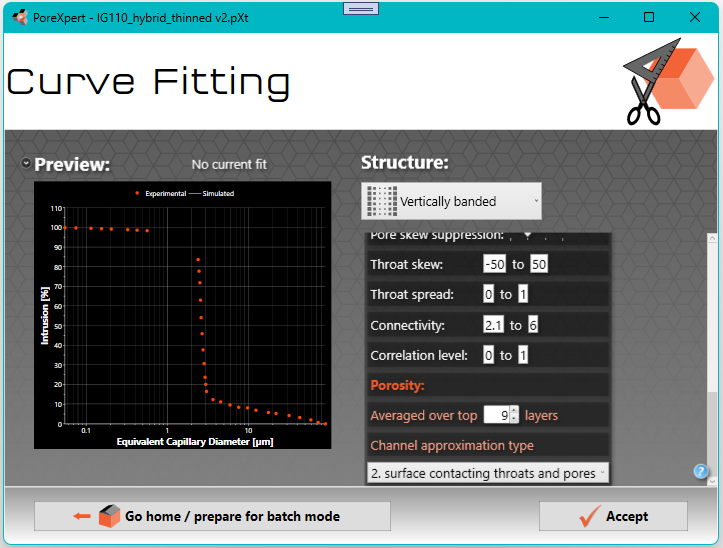
Figure CP 10.
The screen shows you two defaults: that the channel porosity is Averaged over top 9 layers, and Channel approximation type 2, namely surface contacting throats and pores. For most uses of PoreXpert in channel porosity mode, these defaults can be left unchanged. However advanced users should check that these default values are appropriate, as explained below.
Choosing the number of layers for estimating the porosity
If the open porosity is calculated from just the single top layer of the unit cell, i.e. the xy plane at maximum z, then the result is very unstable - there is just too little information in a single layer of just surface throats and pores, so the open porosity estimates will vary to an unusable degree. So the channel porosity is calculated as an average of several layers, starting from the top of the unit cell where the percolation takes place, counting downwards (i.e. in the -z direction). The default is 9 layers. You need to consider whether that is sensible. If you do a trial fit and the correlation coefficient is found to be low (less than 0.3) then the unit cell is fairly homogenous throughout and so the number of layers is not critical. However, for high correlation coefficients (> 0.5) it does matter. Say that you find the Horizontal Large to Small structure (HLtoS) to be the most appropriate, and there is a high correlation level in your trial fit, then consider carefully whether averaging over 9 layers is sensible. For the HLtoS structure, the voids sizes grade from large at maximum z down to smallest at minimum z, except for a connecting layer at the bottom of the unit cell to connect with its next identical replicate. So if you are using a 25x25x25 unit cell, then that should be sensible, but maybe not if you are scoping out the fits with a 15x15x15 unit cell. For the default structure type, Vertically banded, then the layers are all similar to each other moving down in the -z direction, so the choice of number of layers is not critical.
The pragmatic approach is to us as large a unit cell as possible, 20x20x20 or above, and leave the number of layers for approximation at its default setting of 9.
If the channel porosity is averaged over 4, 9 or 16 layers, then the effect can later be visualised as a 2x2, 3x3 or 4x4 grid surface (see Channel porosity visualisation).
Choosing the approximation type
With respect to the Approximation type, you need to consider what the image analysis of your electron micrograph is actually telling you about the porosity of the sample. The observed surface of a PoreXpert unit cell is always represented as the xy plane at maximum z, i.e. the top surface of the default unit cell image.
There are four options to choose from:
1. surface-contacting throats;
2. surface-contacting throats and pores (the default);
3. surface-contacting throats, pores and neighboring aligned throats;
4. all throats normal to the surface (i.e. in the -z direction relative to the observed (top) surface in the xy plane), and the pores of these throats.
All these approximations control how the PoreXpert unit cell represents your porous material. The appropriate level of approximation will depend on the smoothness of the surface viewed by electron microscopy (e.g. whether or not polished) and the nature of the material itself. The approximations relate to dimensions of the PoreXpert unit cell, not to the dimensions of your material - so you must judge how to map one onto the other. The following diagram helps to explain them further.
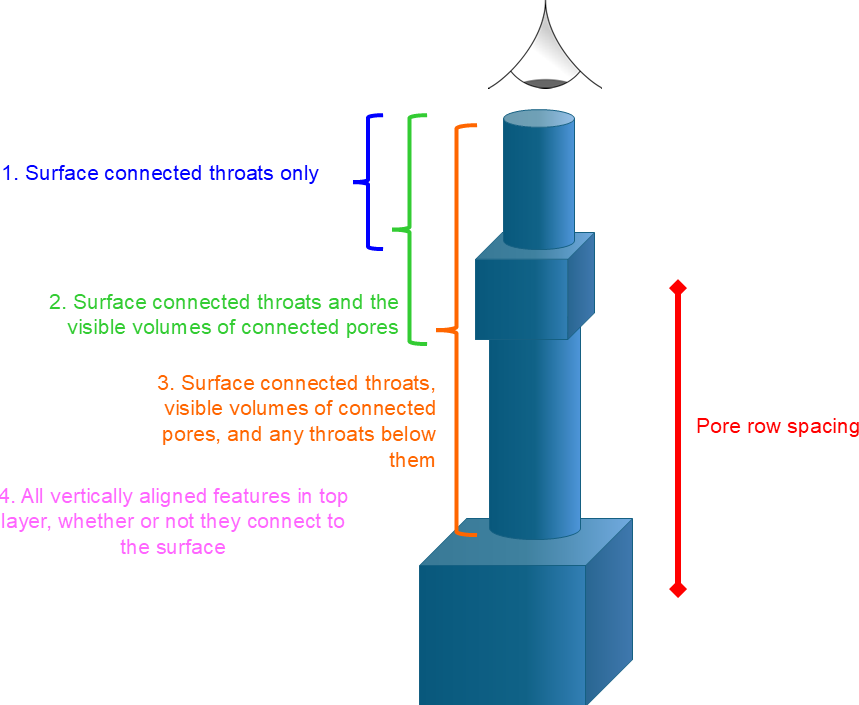
Figure CP 11. The four levels of approximation relating observation and image analysis of your micrograph to the PoreXpert unit cell
In order to make calculations tractable, the features within a PoreXpert unit cell are set on a Cartesian grid which is equally spaced on each Cartesian (x,y and z) direction. No pores can overlap, so the spacing between pores, i.e. the pore row spacing, is always larger than the largest pore that you model. In this example, the largest pore modelled is 89.14 μm, Figure CP 2. So to choose the appropriate approximation, look at your electron micrograph, and map the pore row spacing onto it. Then ask yourself how far you are looking into the interior of the sample relative to that pore row spacing. The default is that you can see the surface throats (which are always visible), and the surface-connected pores behind them. Clearly when first choosing the approximation level, you have not yet generated a unit cell, so the choice is iterative - first use the default, generate the unit cell as exemplified below in Figure CP 16, look at the pore row spacing, and then reconsider whether the default approximation is the correct one.
The standard porosity is that based on pycnometry, or the porosity judged by mercury porosimetry, so is based on the entire accessible, or open, porosity. However, channel porosity is based on just the top surface of the unit cell. Normally, however, that is an unrepresentatively small part of the unit cell, especially for smaller unit cells such as the default 15 x 15 x15 array. So the channel porosity is calculated as an average over more than just the surface layer. The default is the top 9 layers. It is important to consider whether 9 layers gives a representation of the porosity of the whole unit cell. If, for example, a horizontally banded structure type is being used on a 15 x 15 x 15 grid, then 9 layers would not give a representative sampling of the whole structure. However, for the default vertically banded structure, 9 layers from 15 is a reasonable representation, as the layers do not fundamentally vary in the -z direction. The number of layers can be varied up to the maximum number of layers within the unit cell, but for visualisation purposes, it must be the square of an integer - i.e. 1, 4 9, 16 or 25, as will be explained.
Beware of choosing approximation 1 unless you have a perfectly smooth surface which genuinely only shows the emerging surface throats, such that you do not have any additional information to supply. Approximation 1 gives very little information to the simplex, and so its answers for different stochastic generations, unit cell sizes and number of layers for the porosity averaging will vary widely, to the extent that there may be no indication of the correct open porosity, and hence of other properties such as permeability. As you choose higher approximation type numbers, larger cell sizes, and larger number of layers over which to average the porosity, then simplex results for the different stochastic generations and unit cell sizes will converge much more closely onto what PoreXpert calculates as the correct open porosity. Whatever approximation type and number of averaging layers you choose, it is essential to compare different stochastic generations to check that you have a stably convergent answer.
You may then ask why approximation 1 is allowed. This is the closest approximation to porometry, but at the time of writing of this Help edition, we have not tried it on actual porometry samples.
If you understand how to generate the unit cell and find the pore row spacing, then you can now proceed to the Channel Porosity Visualisation page.
If not, then you can work through the detail in the Simplex Fitting page, or follow the summary screenshots below which guide you through how to do that for the IG110 graphite example.
Fitting a sample based on its percolation characteristic and channel porosity
To fit the percolation curve of the IG110 sample, click Accept on the Curve fitting screen, Figure CP 10. After fitting the percolation characteristic and porosity, you will be returned to the Operations List screen, which will show the distance from the simulated and experimental percolation curves. The example shown below shows a distance of 2.02%, which is not particularly good - you should aim for fits considerably better than (lower than) 2%. Your results are likely to be different from those shown in Figure CP 12 - PoreXpert improves its fits as it becomes more experienced with a sample, provided the Learning option is switched on, which it is by default.
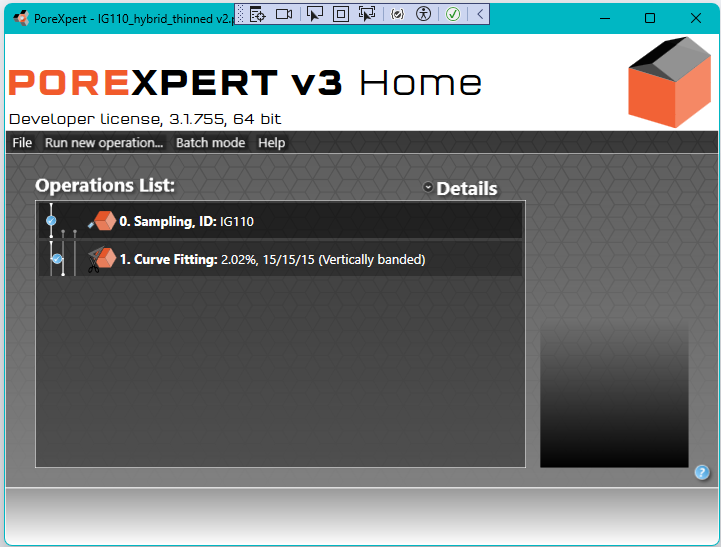
Figure CP 12.
Double-Clicking on Operation 1. Curve fitting, Figure CP 12, reveals the parameters, as shown below. When in channel porosity mode, the most important result is usually the estimate of open porosity, which takes into account void features not visible from the surface, such as cross-links between channels and pores larger than those visible at the surface. In this case it can be seen that the porosity estimate is 4.62%, against a channel porosity of 2.67%. Although the open porosity estimate is comfortingly larger than the channel porosity, in fact it is completely the wrong answer scientifically, as the actual open porosity is around 20%. There are three reasons for the incorrect result: (i) the unit cell is too small, (ii) it has the wrong structure type, and (iii) most importantly there should be a maximum range to the image analysis investigation, not just a minimum diameter. The incorrect answer emphasises the need to input all parameters very carefully, and follow all procedures to optimize the void network simulation. The actual validation of the IG110 has been published as a poster in May 2025, available to download from https://www.porexpert.com/downloads/software-applications/ .
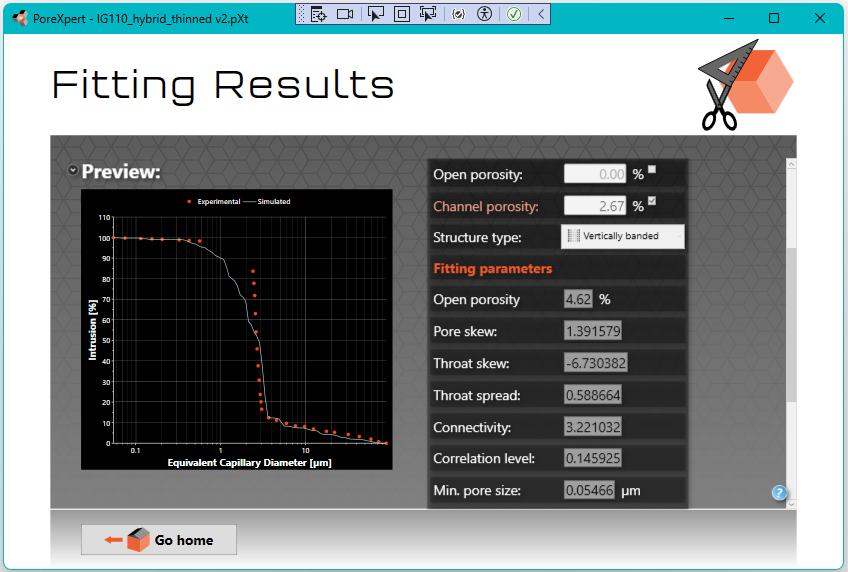
Figure CP 13
For the purposes of these instructions, we will stay with the current results. The next stage is to Build the unit cell:
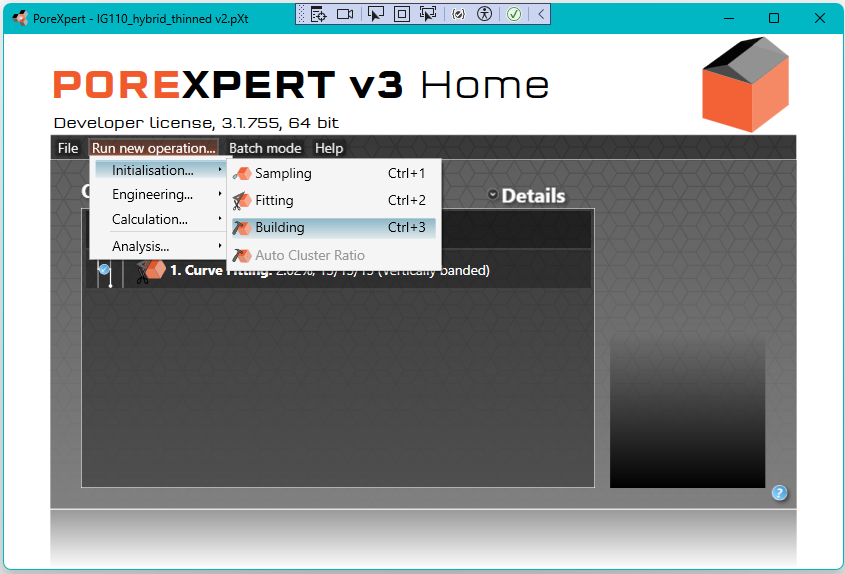
Figure CP 14
Left-clicking on the resulting operation 2. Unit Cell Building gives the choice of two view modes :
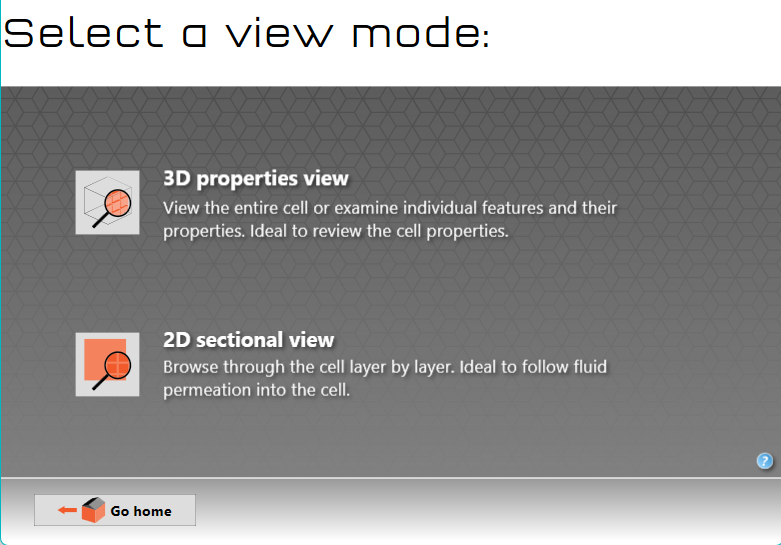
Figure CP 15
Left-clicking on 3D properties view displays the unit cell:
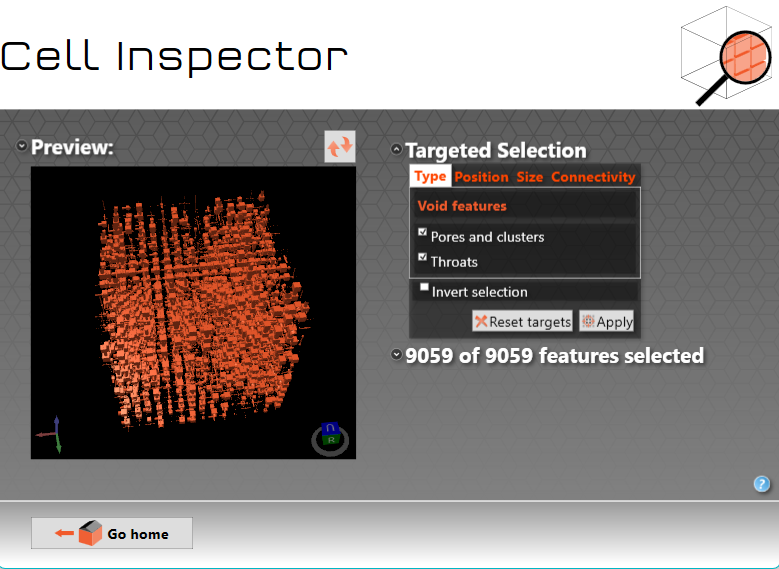
Figure CP 16
Now you can proceed to the Channel Porosity Visualisation page.